

FLUX.1 Kontext
FLUX.1 Kontext is Black Forest Labs’ instruction-guided editing model. You provide an input image and a natural-language description of the change you want — “make the sky stormy”, “swap the dress for a leather jacket”, “add a bowler hat” — and the model rewrites only the regions the prompt describes while keeping the rest of the scene, characters, and lighting intact. It is the model to reach for when you need surgical, in-place edits without the artifacts that mask-based inpainting tends to introduce.
Architecture
Section titled “Architecture”FLUX.1 Kontext extends the FLUX.1 rectified-flow transformer with a context-conditioning path that takes the reference image as a sequence of latent tokens alongside the text prompt. The model is trained to attend jointly to those visual tokens and the instruction, which is why it preserves identity, framing, and unedited regions much better than a vanilla img2img loop. Two characteristics of the architecture matter in practice:
- Token-level conditioning, not noise blending — the input image is fed in as latent context rather than as a noised latent the model gradually denoises. Untouched regions stay near pixel-perfect, with no
strengthknob to tune - Single-pass editing — one prompt, one forward pass. There is no separate mask, no two-stage inpaint+blend. The model decides which pixels the instruction describes
Choosing a variant
Section titled “Choosing a variant”| Variant | Best for | Generation time | Price |
|---|---|---|---|
| Pro | Production editing at scale | ~6s | $0.04 |
| Max | Complex multi-step instructions, hardest edits | ~7s | $0.08 |
| Dev | Style-preset workflows, lowest cost | ~7s | $0.025 |
FLUX.1 Kontext [pro] — the default. Hosted by Black Forest Labs, served through Prodia’s /v2/job endpoint with both image generation (txt2img) and image editing (img2img) modes. Supports the full set of aspect_ratio values and a safety_tolerance knob from 0 (strict) to 6 (permissive).
FLUX.1 Kontext [max] — same modes as Pro with stronger prompt adherence on harder edits — fine-grained instructions, multiple changes in a single prompt, edits that need to reason about lighting or geometry. Roughly 2x the cost and slightly slower. safety_tolerance caps at 2 on the editing endpoint.
FLUX.1 Kontext [dev] — open-weight distilled variant served through Prodia’s fast pipeline. Edit-only (img2img). Exposes 17 style_preset values and explicit width, height, steps, and guidance_scale knobs in exchange for dropping the aspect_ratio field.
When to use FLUX.1 Kontext
Section titled “When to use FLUX.1 Kontext”- Localized edits with identity preservation — character changes, prop swaps, outfit changes, expression edits where everything off-prompt should stay frozen
- Edits that would need a mask elsewhere — Kontext figures out the region from the prompt, so you don’t have to author or compute a mask
- Style transfer with structure preservation — “make this a watercolour painting” or “render in pixel art” while keeping the original composition
- High-aspect ratios for txt2img — the v1 endpoints support nine fixed ratios from 9:21 to 21:9; v2 accepts arbitrary
W:Hstrings
For prompt-only generation without a reference image, FLUX.2 produces stronger photorealistic output. For natural-language editing on Google’s Gemini family, Nano Banana is a flat-rate alternative. For mask-based region replacement (rather than instruction-based editing), see the flux-fill.dev.v1 and SDXL inpainting job types.
Job types
Section titled “Job types”FLUX.1 Kontext [pro]:
| Job type | Description | ETA |
|---|---|---|
inference.flux-kontext.pro.txt2img.v2 |
Generate an image from text | ~6s |
inference.flux-kontext.pro.img2img.v2 |
Edit an input image with a prompt | ~6s |
FLUX.1 Kontext [max]:
| Job type | Description | ETA |
|---|---|---|
inference.flux-kontext.max.txt2img.v2 |
Generate an image from text | ~7s |
inference.flux-kontext.max.img2img.v2 |
Edit an input image with a prompt | ~7s |
FLUX.1 Kontext [dev]:
| Job type | Description | ETA |
|---|---|---|
inference.flux-fast.dev-kontext.img2img.v1 |
Edit an input image with style-preset support | ~7s |
Parameters
Section titled “Parameters”Pro and Max — txt2img.v2 and img2img.v2:
prompt(required) — text description, 3–4,096 characters. Forimg2imgthis is the editing instructionaspect_ratio— any string of the formW:H(e.g.16:9,3:2,21:9). Defaults to the input aspect ratio forimg2imgprompt_upsampling— boolean, defaultfalse. Whentruethe model rewrites your prompt into a richer description before generating; useful for short promptssafety_tolerance— integer.txt2img: 0–6, default 4.img2img: 0–2, default 2. Lower values apply stricter content moderationseed— integer for reproducible output
Pro and Max — img2img inputs:
- A single input image attached as the multipart
inputpart. Accepted: PNG, JPEG, or WebP, 256–1920 pixels per side, max 10 MB
Dev — flux-fast.dev-kontext.img2img.v1:
prompt(required) — 3–4,096 charactersstyle_preset— one of3d-model,analog-film,anime,cinematic,comic-book,craft-clay,digital-art,enhance,fantasy-art,isometric,line-art,low-poly,neon-punk,origami,photographic,pixel-art,texturewidthandheight— output dimensions, 512–1040 in multiples of 32, default1024steps— diffusion steps, 1–50, default30guidance_scale— classifier-free guidance, default2.5seed— integer for reproducible outputprogressive— boolean, defaultfalse. When the response is JPEG, return a progressive JPEG
Prompting tips
Section titled “Prompting tips”- Describe the change, not the whole scene. For
img2imgwrite the diff — “replace the apple pie with a chocolate cake” — not the full description. The model already sees the input - Anchor preservation explicitly when a small change risks pulling the rest of the image with it: “…keep the wooden table, window, and lighting exactly the same”
- Use
prompt_upsamplingfor short prompts. It rewrites a five-word prompt into a richer description before generation. Skip it when you have already written the prompt you want - For
txt2img, chooseaspect_ratiodeliberately. Defaults to1:1. Set9:16or16:9rather than upscaling or cropping later - Reach for [max] on multi-step instructions. If a single prompt has two or three independent changes (“recolour the door, add a bicycle, and put leaves on the trees”), Max follows all three more reliably than Pro
- Tighten
safety_tolerancefor user-facing apps —0or1for txt2img-from-user-input is a reasonable starting point
Examples
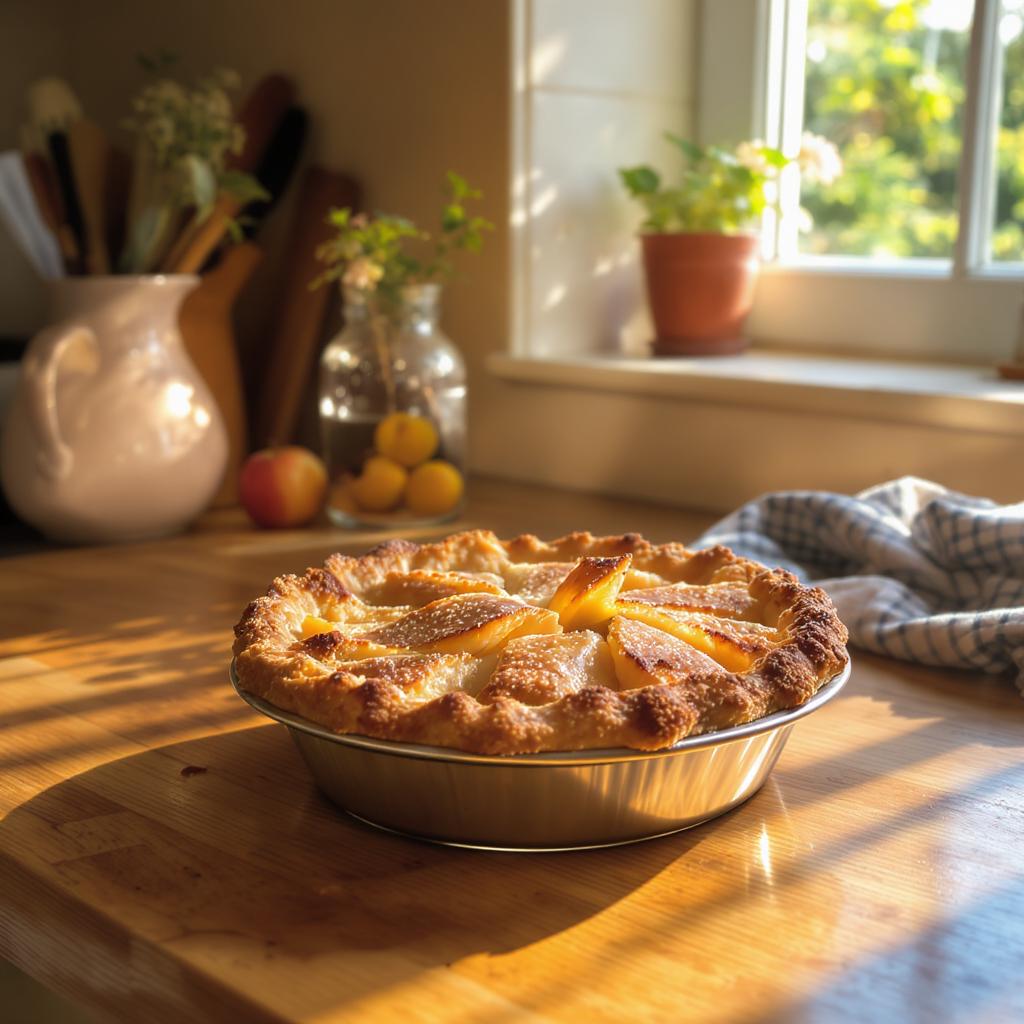
Section titled “Examples”Apple pie generated with txt2img.v2:
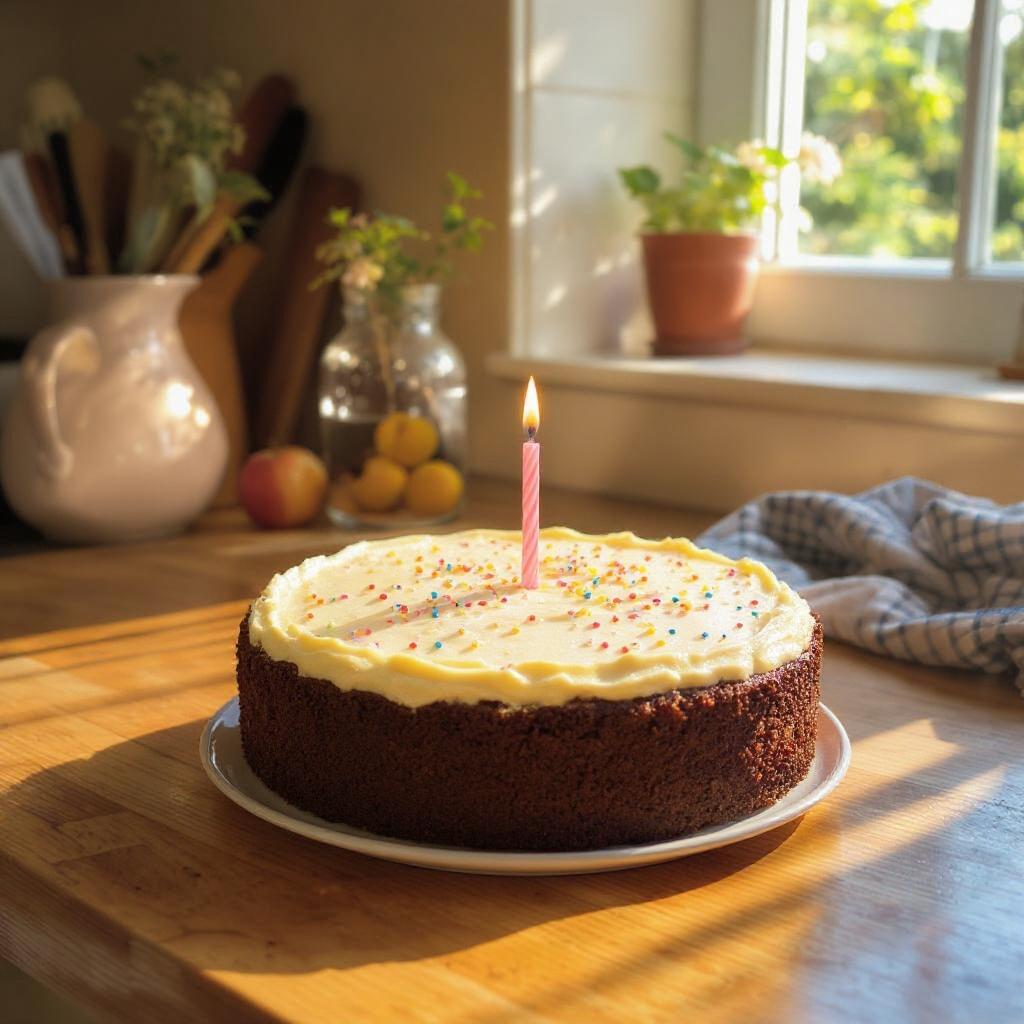
The same image edited with img2img.v2 to swap the pie for a chocolate cake while preserving the kitchen, window, and lighting:
Text-to-image at a wide aspect ratio:
{ "type": "inference.flux-kontext.pro.txt2img.v2", "config": { "prompt": "A small, freshly baked apple pie sitting on a wooden kitchen table by a sunny window, golden flaky crust, warm afternoon light, soft natural shadows, photorealistic", "aspect_ratio": "1:1", "seed": 42 }}Instruction-based editing — replace the pie above with a chocolate cake while preserving the rest of the scene:
{ "type": "inference.flux-kontext.pro.img2img.v2", "config": { "prompt": "replace the apple pie with a chocolate birthday cake with white frosting and rainbow sprinkles, keep the wooden table, window, and lighting the same" }}Multi-step instruction with the Max variant:
{ "type": "inference.flux-kontext.max.img2img.v2", "config": { "prompt": "change the season to winter, add fresh snow on the windowsill outside, dim the indoor lighting to dusk, and place a steaming mug of cocoa next to the cake", "safety_tolerance": 1 }}Style-preset edit with the Dev variant:
{ "type": "inference.flux-fast.dev-kontext.img2img.v1", "config": { "prompt": "the same scene rendered as a hand-painted illustration", "style_preset": "anime", "width": 1024, "height": 1024, "steps": 30 }}