

Nano Banana
Nano Banana is Google’s image generation and editing model. It is the model that powers the conversational, prompt-driven image editing in the Gemini app — you describe what you want changed in natural language, and the model edits the image while preserving everything else. On Prodia, both modes are exposed as flat-rate jobs that complete in around 8 seconds.
Architecture
Section titled “Architecture”Nano Banana is a multimodal model built on Google’s Gemini family. It accepts text and images in the same context window, which is what makes its editing behavior different from a typical diffusion img2img: rather than running noise through a pre-conditioned latent, the model reads the input image as visual tokens and reasons about which regions the prompt describes. In practice this means edits stay tightly localized — change “the puppy’s collar” and the rest of the scene, lighting, and pose stay frozen.
The text-to-image variant uses the same model with no input images, generating output from prompt and aspect ratio alone.
When to use Nano Banana
Section titled “When to use Nano Banana”- Localized edits to existing images — adding, removing, or modifying a specific element while keeping the rest of the image unchanged. Identity preservation, prop swaps, expression edits, clothing changes
- Multi-image composition — img2img.v2 accepts up to 3 input images, useful for combining a subject from one photo with a setting from another
- Conversational prompt style — the model responds well to natural-language instructions (“add a red bow tie”, “make it nighttime”) rather than the keyword-heavy prompts used for diffusion models
- Flat per-job pricing — every job is $0.039 regardless of resolution or aspect ratio, so cost is predictable
For photorealistic generation with style presets and high-resolution output up to 4096px, FLUX.2 is a stronger choice. For native text rendering inside images, see Recraft V4. For higher-fidelity Google models with selectable resolution up to 4K, see Gemini 3.
Job types
Section titled “Job types”| Job type | Description | ETA |
|---|---|---|
inference.nano-banana.txt2img.v2 |
Generate an image from a text prompt | ~8s |
inference.nano-banana.img2img.v2 |
Edit one or more input images (up to 3) with a text prompt | ~8s |
inference.nano-banana.img2img.v1 |
Single-image editing (deprecated — use v2) | ~8s |
The nano-banana processor on Prodia also serves Google’s higher-tier Gemini image models with selectable resolution up to 4K:
| Job type | Description | ETA |
|---|---|---|
inference.gemini-3-pro.txt2img.v1 |
Gemini 3 Pro text-to-image | ~10s |
inference.gemini-3-pro.img2img.v1 |
Gemini 3 Pro image-to-image (up to 3 inputs) | ~12s |
inference.gemini-3-1-flash.txt2img.v1 |
Gemini 3.1 Flash text-to-image, optional Google Search grounding | ~30s |
inference.gemini-3-1-flash.img2img.v1 |
Gemini 3.1 Flash image-to-image (up to 14 inputs) | ~35s |
Parameters
Section titled “Parameters”inference.nano-banana.txt2img.v2:
prompt(required) — text description of the desired output, up to 2,500 charactersaspect_ratio— one of1:1(default),2:3,3:2,3:4,4:3,4:5,5:4,9:16,16:9,21:9include_messages— whentrue, the response also returnsmessage.txtparts containing the model’s natural-language reasoning
inference.nano-banana.img2img.v2:
prompt(required) — describe the edit you want, up to 2,500 charactersimages— array of 1–3 input image filenames sent as multipartinputpartsaspect_ratio— one ofauto(default — match the first input),1:1,2:3,3:2,3:4,4:3,9:16,16:9,21:9include_messages— see above
Prompting tips
Section titled “Prompting tips”- Describe the change, not the whole scene. For img2img edits, write what should be different (“add a red bow tie”) rather than re-describing the entire image — the model already sees the input
- Anchor preservation explicitly. Phrases like “keep everything else exactly the same” reduce drift in untouched regions, especially for subtle edits
- Use natural language. Nano Banana is a multimodal LLM, not a CLIP-conditioned diffusion model. Conversational instructions outperform comma-separated keyword prompts
- Reference inputs by position. When passing multiple images to
img2img.v2, refer to them in order — “the subject from the first image, in the setting from the second image” - Pick
aspect_ratiodeliberately for txt2img. The default is1:1. For social, web, or phone use cases, set9:16or16:9rather than upscaling/cropping after the fact
Examples
Section titled “Examples”Text-to-image at 16:9:
{ "type": "inference.nano-banana.txt2img.v2", "config": { "prompt": "a cute corgi puppy in a sunny meadow with wildflowers, soft natural light, photorealistic", "aspect_ratio": "16:9" }}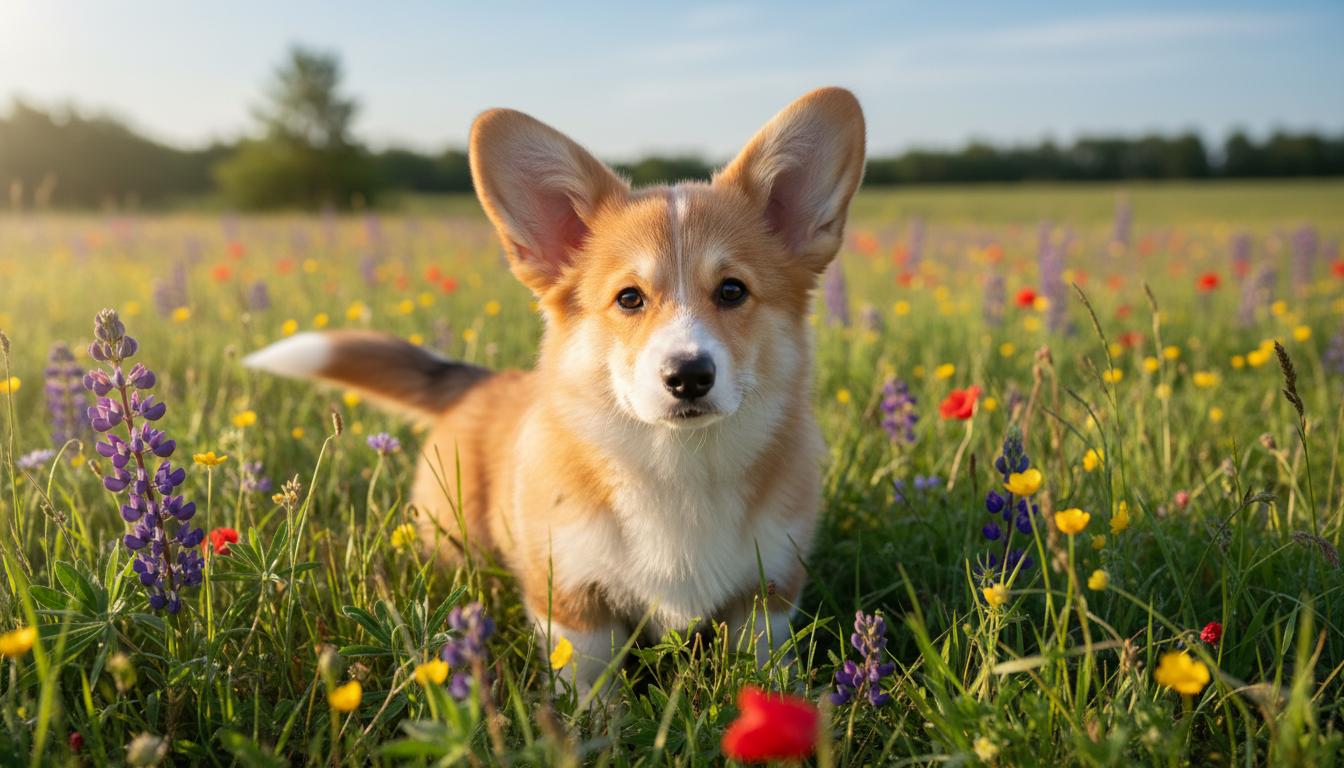
Image-to-image edit (using the previous output as input):
{ "type": "inference.nano-banana.img2img.v2", "config": { "prompt": "Add a small red bow tie to the puppy. Keep everything else exactly the same.", "aspect_ratio": "16:9" }}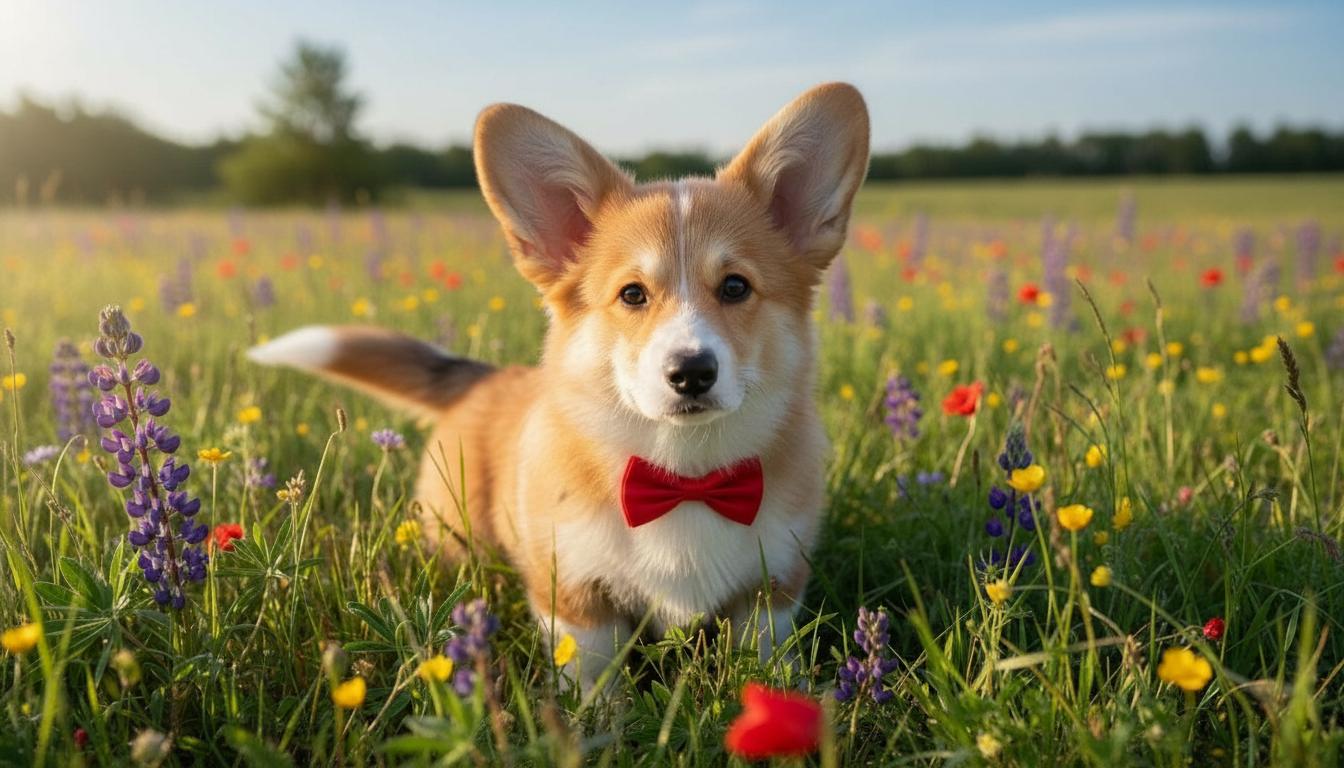
Notice how the puppy’s pose, fur, the wildflowers, the lighting, and the background are all preserved — only the bow tie is added.
Multi-image composition (up to 3 inputs):
{ "type": "inference.nano-banana.img2img.v2", "config": { "prompt": "Place the product from the first image onto the wooden surface in the second image, matching the warm lighting.", "images": ["product.jpg", "surface.jpg"], "aspect_ratio": "3:2" }}