

Restoring Faces
We’re going to walk through how to take a low-quality face image and restore it using the face restoration endpoint. We’ll also show how to upscale the image at the same time.
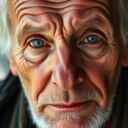
We’ll be using a small, degraded portrait as our input image:
Project Setup
Section titled “Project Setup”# Create a project directory.mkdir prodia-restoring-facescd prodia-restoring-facesInstall Node (if not already installed):
brew install node# Close the current terminal and open a new one so that node is available.apt install node# Close the current terminal and open a new one so that node is available.winget install -e --id OpenJS.NodeJS.LTS# Close the current terminal and open a new one so that node is available.Create project skeleton:
# Requires node --version >= 18# Initialize the project with npm.npm init -y
# Install the prodia-js library.npm install prodia --save
Install Python (if not already installed):
brew install python# Close the current terminal and open a new one so that python is available.apt install python3 python3-venv python-is-python3# Close the current terminal and open a new one so that python is available.winget install -e --id Python.Python.3.12# Close the current terminal and open a new one so that python is available.# Requires python --version >= 3.12python -m venv venvsource venv/bin/activatepip install requestsInstall curl (if not already installed):
brew install curl# Close the current terminal and open a new one so that curl is available.apt install curl# Close the current terminal and open a new one so that curl is available.# NOTE: Windows 10 and up have curl installed by default and this can be# skipped.winget install -e --id cURL.cURL# Close the current terminal and open a new one so that curl is available.# Export your token so it can be used by the main code.export PRODIA_TOKEN=your-token-hereYour token is exported to an environment variable. If you close or switch your
shell you’ll need to run export PRODIA_TOKEN=your-token-here again.
Create a main file for your project:
const { createProdia } = require("prodia/v2");
const prodia = createProdia({    token: process.env.PRODIA_TOKEN // get it from environment});
Create the following main.py
from requests.adapters import HTTPAdapter, Retryimport osimport requestsimport sys

prodia_token = os.getenv('PRODIA_TOKEN')prodia_url = 'https://inference.prodia.com/v2/job'
session = requests.Session()retries = Retry(allowed_methods=None, status_forcelist=Retry.RETRY_AFTER_STATUS_CODES)session.mount('http://', HTTPAdapter(max_retries=retries))session.mount('https://', HTTPAdapter(max_retries=retries))session.headers.update({'Authorization': f"Bearer {prodia_token}"})set -euo pipefailYou’re now ready to make some API calls!
Restore a face
Section titled “Restore a face”const { createProdia } = require("prodia/v2");const fs = require("node:fs/promises");
const prodia = createProdia({ token: process.env.PRODIA_TOKEN,});
(async () => { // get input image const inputBuffer = await (await fetch("https://docs.prodia.com/facerestore-input.jpg")).arrayBuffer();
const job = await prodia.job({ type: "inference.facerestore.v1", }, { inputs: [ inputBuffer ] });
const image = await job.arrayBuffer(); await fs.writeFile("restored.jpg", new Uint8Array(image));})();node main.jsfrom requests.adapters import HTTPAdapter, Retryfrom io import BytesIOimport jsonimport osimport requestsimport sys
prodia_token = os.getenv('PRODIA_TOKEN')prodia_url = 'https://inference.prodia.com/v2/job'
session = requests.Session()retries = Retry(allowed_methods=None, status_forcelist=Retry.RETRY_AFTER_STATUS_CODES)session.mount('http://', HTTPAdapter(max_retries=retries))session.mount('https://', HTTPAdapter(max_retries=retries))session.headers.update({'Authorization': f"Bearer {prodia_token}"})
try: with open('facerestore-input.jpg', 'rb') as f: input_image = f.read()except FileNotFoundError: res = requests.get('https://docs.prodia.com/facerestore-input.jpg') input_image = BytesIO(res.content) with open('facerestore-input.jpg', 'wb') as f: f.write(res.content)except Exception as e: raise e
headers = { 'Accept': 'image/jpeg',}
job = { 'type': 'inference.facerestore.v1',}
files = [ ('job', ('job.json', BytesIO(json.dumps(job).encode('utf-8')), 'application/json')), ('input', ('facerestore-input.jpg', input_image, 'image/jpeg')),]
res = session.post(prodia_url, headers=headers, files=files)print(f"Request ID: {res.headers['x-request-id']}")print(f"Status: {res.status_code}")
if res.status_code != 200: print(res.text) sys.exit(1)
with open('restored.jpg', 'wb') as f: f.write(res.content)python main.pyset -euo pipefail
cat <<EOF > job.json{ "type": "inference.facerestore.v1"}EOF
if [[ ! -f facerestore-input.jpg ]]; then curl -Lo facerestore-input.jpg 'https://docs.prodia.com/facerestore-input.jpg'fi
curl -sSf --retry 3 \ -H "Authorization: Bearer $PRODIA_TOKEN" \ -H 'Accept: image/jpeg' \ --output restored.jpg \ https://inference.prodia.com/v2/jobbash main.shopen restored.jpgxdg-open restored.jpgstart restored.jpgThe restored face has sharper features and clearer details compared to the input:

Restore and upscale
Section titled “Restore and upscale”The facerestore.upscale endpoint combines face restoration with upscaling. You can upscale by 2x, 4x, or 8x.
const { createProdia } = require("prodia/v2");const fs = require("node:fs/promises");
const prodia = createProdia({  token: process.env.PRODIA_TOKEN,});
(async () => {  // get input image  const inputBuffer = await (await fetch("https://docs.prodia.com/facerestore-input.jpg")).arrayBuffer();
  const job = await prodia.job({    type: "inference.facerestore.upscale.v1",    config: {      upscale: 4,    },  }, {    inputs: [ inputBuffer ]  });
const image = await job.arrayBuffer(); await fs.writeFile("restored-upscaled.jpg", new Uint8Array(image));})();node main.jsfrom requests.adapters import HTTPAdapter, Retryfrom io import BytesIOimport jsonimport osimport requestsimport sys
prodia_token = os.getenv('PRODIA_TOKEN')prodia_url = 'https://inference.prodia.com/v2/job'
session = requests.Session()retries = Retry(allowed_methods=None, status_forcelist=Retry.RETRY_AFTER_STATUS_CODES)session.mount('http://', HTTPAdapter(max_retries=retries))session.mount('https://', HTTPAdapter(max_retries=retries))session.headers.update({'Authorization': f"Bearer {prodia_token}"})
try: with open('facerestore-input.jpg', 'rb') as f: input_image = f.read()except FileNotFoundError: res = requests.get('https://docs.prodia.com/facerestore-input.jpg') input_image = BytesIO(res.content) with open('facerestore-input.jpg', 'wb') as f: f.write(res.content)except Exception as e: raise e
headers = { 'Accept': 'image/jpeg',}
job = { 'type': 'inference.facerestore.upscale.v1', 'config': { 'upscale': 4, },}
files = [ ('job', ('job.json', BytesIO(json.dumps(job).encode('utf-8')), 'application/json')), ('input', ('facerestore-input.jpg', input_image, 'image/jpeg')),]
res = session.post(prodia_url, headers=headers, files=files)print(f"Request ID: {res.headers['x-request-id']}")print(f"Status: {res.status_code}")
if res.status_code != 200: print(res.text) sys.exit(1)
with open('restored-upscaled.jpg', 'wb') as f: f.write(res.content)python main.pyset -euo pipefail
cat <<EOF > job.json{ "type": "inference.facerestore.upscale.v1", "config": { "upscale": 4 }}EOF
if [[ ! -f facerestore-input.jpg ]]; then curl -Lo facerestore-input.jpg 'https://docs.prodia.com/facerestore-input.jpg'fi
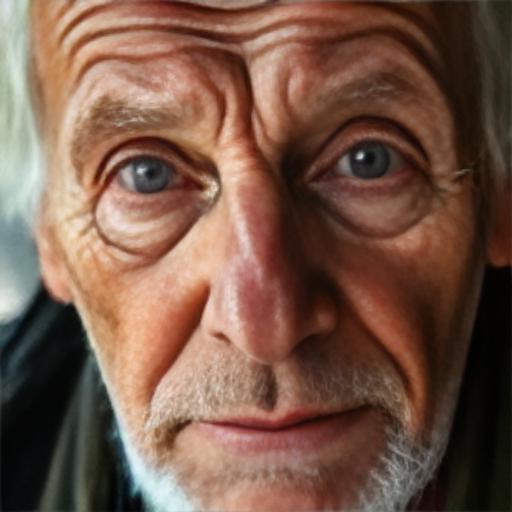
curl -sSf --retry 3 \ -H "Authorization: Bearer $PRODIA_TOKEN" \ -H 'Accept: image/jpeg' \ --output restored-upscaled.jpg \ https://inference.prodia.com/v2/jobbash main.shopen restored-upscaled.jpgxdg-open restored-upscaled.jpgstart restored-upscaled.jpgOur 128x128 input has been restored and upscaled to 512x512 with dramatically improved facial detail:
Parameters
Section titled “Parameters”| Parameter | Type | Values | Default | Description |
|---|---|---|---|---|
upscale |
number | 2, 4, 8 | 2 | Upscale factor (only for facerestore.upscale.v1) |
Input requirements
Section titled “Input requirements”| Constraint | Value |
|---|---|
| Accepted formats | PNG, JPEG, WebP |
| Minimum dimensions | 128 x 128 |
| Maximum dimensions | 2048 x 2048 |
| Maximum file size | 10 MB |